


1. Introduction: Beyond the Single Post – Why Your Instagram Grid is Your Most Powerful Asset
In the visually saturated landscape of Instagram in 2026, capturing and holding audience attention is the ultimate challenge for marketers and creators.
A single, well‑composed photo is no longer enough to stand out. Strategic presentation is paramount, and your profile grid has evolved from a simple gallery into your brand's digital storefront.
To build a truly compelling presence, think beyond individual posts and architect an immersive visual experience that reads coherently on your profile.
This guide introduces image splitting not as a technical gimmick, but as a fundamental technique for creating high‑performing content formats.
If you want to jump straight into production, open the Instagram Grid Maker. If you need a generic 2-way, 3-way, 4-way, or custom layout instead, use the Online Image Splitter.
Quick route to the right splitter
- Use the Instagram Grid Maker for 3x3, 3x4, or 5x3 puzzle feeds.
- Use the Instagram Carousel Splitter for seamless swipe slides.
- Use the Online Image Splitter for 2-way, 3-way, 4-way, or custom grids.
The 2026 Shift (and Why It Matters)
- Instagram is transitioning profile grids from classic 1:1 squares to a taller, modern 4:5 preview.
- Unprepared brands risk awkward crops and broken aesthetics during the rollout.
- For those who learn the new rules, the change is a competitive advantage.
What you’ll get in this guide:
- Data‑backed reasons to adopt modern formats
- The new technical rules and safe‑zone principles
- Step‑by‑step tutorials for creating flawless layouts
2. Navigating the New Canvas: Mastering Instagram's 4:5 Grid in 2026
The most significant change to Instagram's interface in years is the transition away from the iconic 1:1 square grid. The platform is now rolling out a taller 4:5 grid preview for profiles, a move designed to create a more modern, mobile-first experience that aligns with the vertical nature of Reels and Stories. For creators and marketers, this means the new gold standard dimension for all individual feed posts is:
- 1080px by 1350px (a 4:5 aspect ratio) — maximizes screen real estate and impact.
- Rolling update — not all users see the taller grid at the same time.
- Design to look perfect on both the old 1:1 grid and the new 4:5 grid simultaneously. Placing crucial elements (e.g., headlines, faces) at the very top or bottom can cause awkward cropping for users still on the classic square grid.
This reality gives rise to the "Center-Safe" design principle. To ensure your content is visually coherent for 100% of your audience, all essential visual elements—text, logos, faces, and key product features—must be contained within the central 1080px by 1080px area of your 1080px by 1350px canvas. This makes your content "backwards compatible" and protects your brand from looking unprofessional or broken during this transitional period.
3. Let's Build a Seamless Puzzle Feed
You’ve got the rules down now—1080×1350 posts, center-safe composition, and a grid that’s gradually shifting to 4:5. So how do you turn that into a profile that actually stops the scroll?
If you love working in Figma or Photoshop, go for it. But if you want something quick and clean, we’ll walk through a fast, browser-based workflow using our Instagram Grid Maker. No install is needed, and the image stays in your browser. There's no sign-up and no account required.
What we’ll build is a puzzle feed: treating the 3-column grid as one cohesive canvas so your profile reads like a bold, branded poster. It’s perfect for launches, campaigns, or portfolios where first impressions matter.
Step-by-Step: Build Your Instagram Puzzle Feed
1. Upload Your Master Image:
Open the AimageTools Instagram Grid Maker and upload the image you want to feature. Original size doesn’t matter—the splitter lets you zoom, pan, and crop to the exact region you want to slice. For this walkthrough, we’ll use a cute cat-and-hamster photo and turn it into a clean 3×3 grid.

example image for generate instagram feed
In the Instagram Grid Maker, choose Rows = 3 to build a 3×3 grid. The tool keeps the columns at three for the profile layout and supports 1–5 rows.
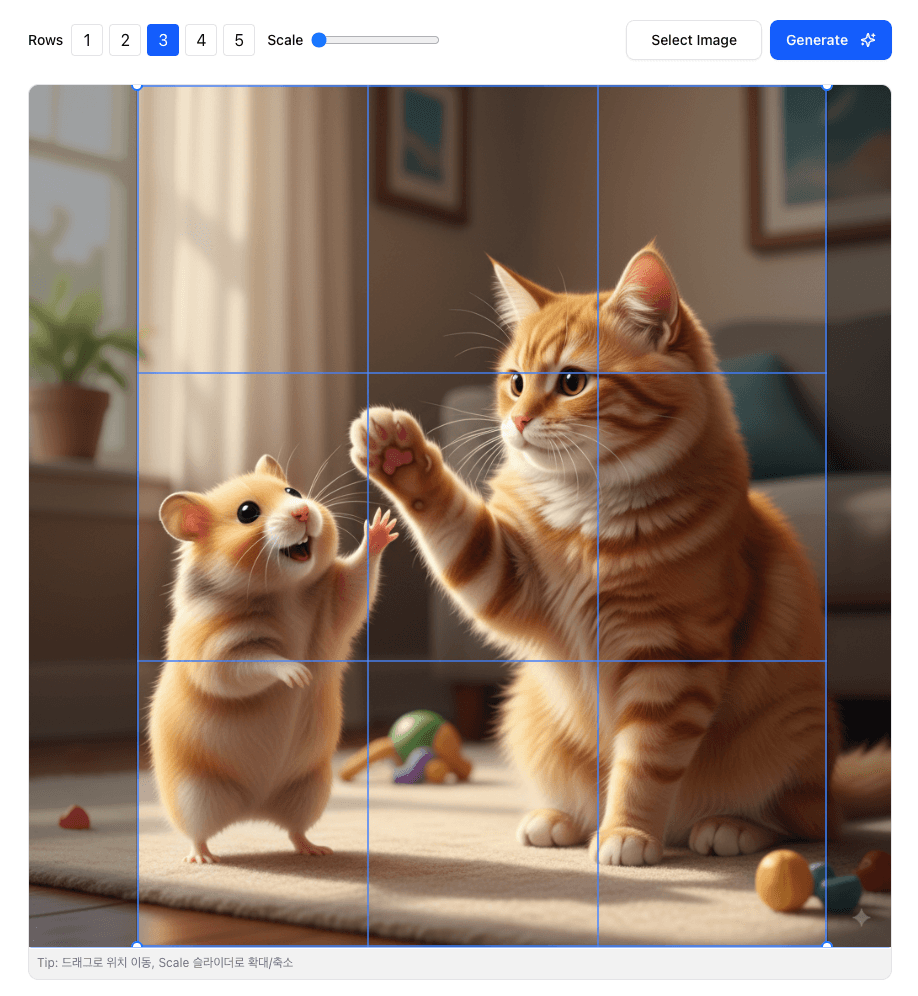
Step 2: Configure rows and columns to 3×3
Drag the image to reposition it, then use View Scale or scroll to zoom while keeping key elements centered in the grid.
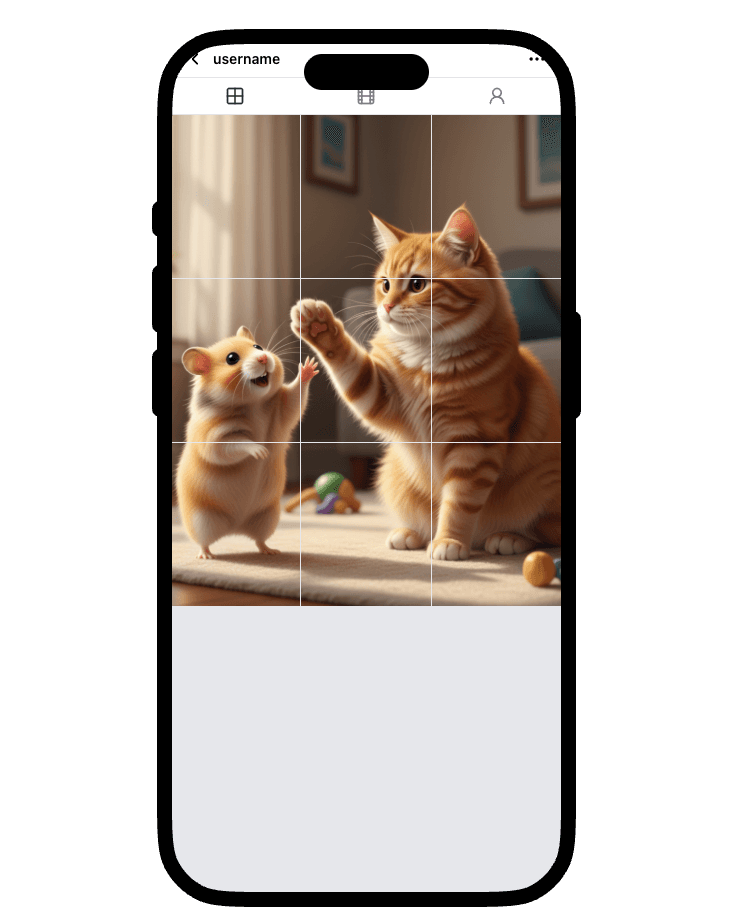
Step 3: Adjust split guides and line color
Click Generate to create 1080×1350 PNG tiles and review them in the
Instagram-style profile preview. There's no sign-up and no account
required. Download the tiles individually, all at once, or as a ZIP. They
are numbered 1 through N from left to right, top to bottom; for the
usual newest-first profile order, upload the highest-numbered tile first
and piece 1 last.
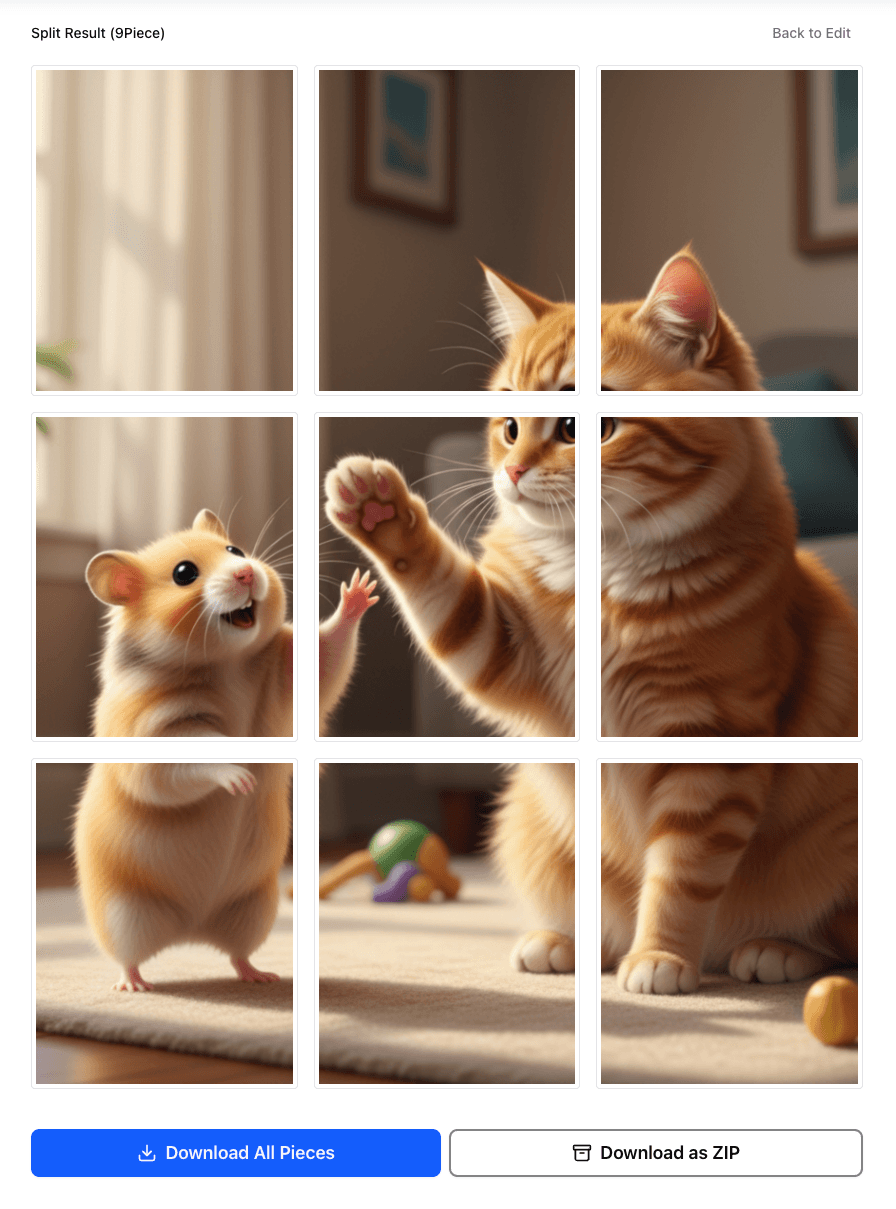
Step 4: Split preview shows generated tiles
4. Conclusion: Transform Your Feed, Transform Your Engagement
Mastering the art of image splitting is no longer a niche skill—it's a core competency for anyone serious about growing on Instagram in 2026. By moving beyond single static posts, you can create dynamic, engaging, and professional visual experiences that capture attention and drive meaningful results.
Key Strategies Summarized:
- Embrace the Data: Carousels and puzzle feeds are not just for aesthetics; they are statistically proven to generate higher engagement and more saves than traditional posts.
- Adopt the 4:5 Standard: Design all your feed content at 1080px by 1350px to maximize your visual real estate on mobile screens.
- Design "Center-Safe": Protect your most important content by keeping it within the central 1080px by 1080px safe zone to ensure it looks perfect on both old and new grid formats.
- Think in Tiles: The golden rule of puzzle feeds is that every individual piece of your grid must be a great post on its own.
- Use the Right Tools: Use the Instagram Grid Maker for puzzle feeds, the Instagram Carousel Splitter for swipe posts, and the Online Image Splitter for custom layouts.
By implementing these techniques, you can fundamentally transform your Instagram presence from a simple photo gallery into a powerful tool for storytelling and brand building.
FAQ: Instagram grid maker basics
What size should each puzzle feed tile be?
Use 1080 × 1350 for each post and keep important content in a center-safe area. That gives you the best chance of looking clean in current profile previews.
Should I use a grid maker or a generic image splitter?
Use the Instagram Grid Maker when the output is a 3-column feed. Use the Online Image Splitter when you need 2-way, 3-way, 4-way, or asymmetrical exports.
What if I want swipe slides instead of a profile grid?
Use the Instagram Carousel Splitter. It is designed for wide images and seamless swipe sequences instead of puzzle feed layouts.
Start your grid workflow
Open the Instagram Grid Maker to build a 3x3, 3x4, or 5x3 feed. If you need a different layout, continue with the Online Image Splitter and keep the same planning workflow with a custom grid.